Designest: AI Home Design
- 3.7
- Rating
- 100.00K
- Installs
- Free
- Price

 Analysis by App-foxy
I tried Designest: AI Home Design as a planning companion for everyday home decisions, and I came away seeing it as more useful for exploring possibilities than for producing a final professional plan. It belongs to the House & Home category, comes from Astronex, and focuses on turning rough ideas about rooms, layouts, and renovations into visual starting points. That makes it especially interesting in a shared household, where one person may care about storage, another about appearance, and someone else about whether the idea is realistic.
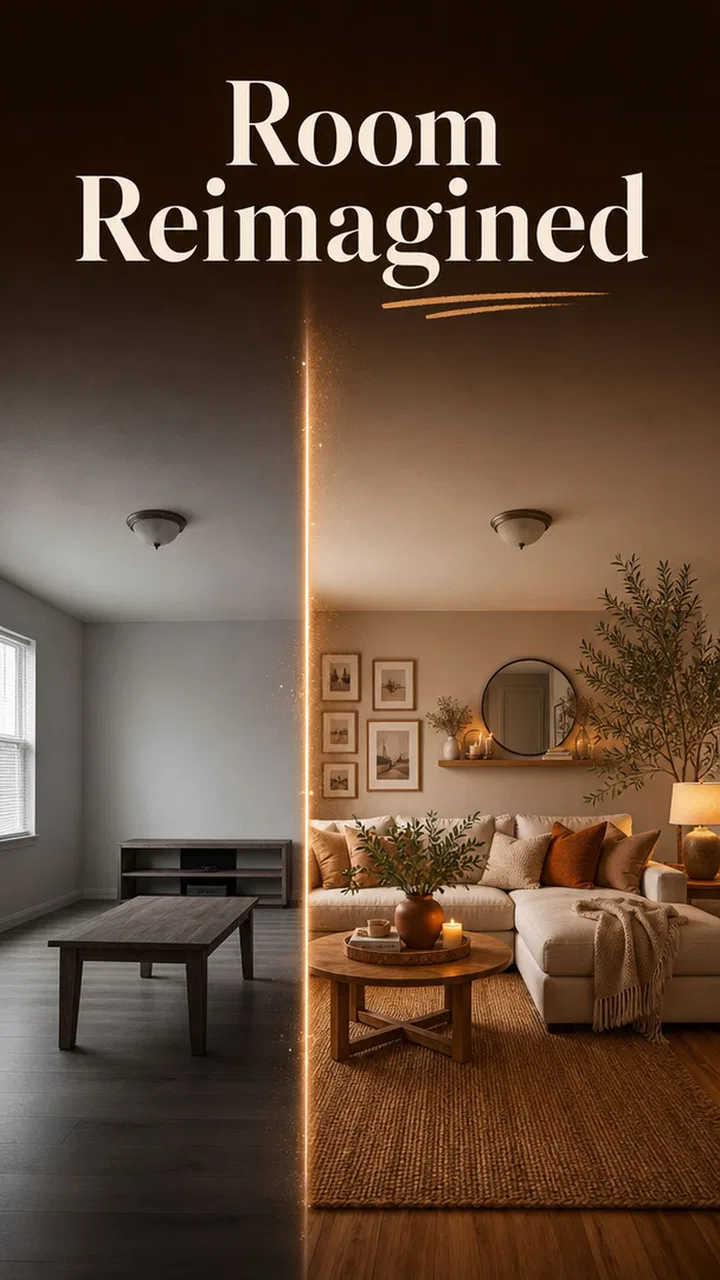
The first thing I noticed is that the app works best when I treat it like a conversation starter. I do not open it expecting a building-ready drawing. Instead, I use it to compare directions: a brighter living room, a more practical bedroom arrangement, or a kitchen renovation with a different visual mood. Its real strength is helping a household move from “we should change this room” to a clearer discussion about what that change might look like.
It is free to install, with optional in-app purchases ranging from $4.99 to $14.99 per item. That combination makes it easy to test before spending anything, although anyone using it seriously should pay attention to which parts of the experience are included and which may require an additional purchase. The app is rated for Everyone, and it runs on Android devices using OS 8.0 or later.
You May Also Like

 Blood Strike: 2.5 Anniversary
Blood Strike’s Loadouts Turn Every Drop Into a Tactical Gamble
A close look at Blood Strike’s custom loadouts: how fast access to signature weapons reshapes its battle royale rhythm, rewards preparation, and narrows the gap between fights.

 Pandora - Music & Podcasts
Pandora’s Music Is Easy to Start, but Harder to Recover
Pandora’s strength is its low-effort path from a seed to a station. Its weak spot is how much confidence it asks you to place in connection, setup, and quiet recovery.

 8 Ball Pool
 Is Built on Rivalries, Rematches, and Routine
A close look at the rivalries, rematches, shared routines, and unanswered safety questions that turn a quick pool match into a persistent mobile community.

 Samsung Music
’s Quiet Strength Is Playing What You Already Own
Its reach comes less from spectacle than from dependable access to a personal library. That simplicity is both the app’s strongest retention engine and its ceiling.

 AccuWeather: Weather Radar
AccuWeather Review: A Quick, Clear Forecast for Everyday Decisions
For everyday plans, the best forecast is the one you can understand quickly. AccuWeather makes rain timing, radar, and local conditions easy to act on, with a few trade-offs.

 Hill Climb Racing
Why Hill Climb Racing Still Turns Crashes Into One More Run
A tiny car, a bumpy hill and one more upgrade: Hill Climb Racing keeps resurfacing because its simple chaos makes every near-miss feel personal.
More From Our News Desk
View All News


Using Designest when several people share the home
When several people share a home, I find it helps to treat a design session as a way to gather viewpoints rather than settle a choice on the spot. Asking each person to name one daily annoyance the room should solve can keep the ideas grounded in how the space is actually used. That shared starting point leads naturally to a closer look at how to coordinate suggestions without confusing inspiration with approval.
A practical shared-use scenario
A realistic way to use this app is during a small household renovation that has not yet reached the contractor stage. Imagine that a couple wants to improve a cramped living room. One person wants a calmer, more open look, while the other worries about losing seating and storage. Rather than arguing from memory, they can use Designest to explore a few different directions and compare what feels closest to their needs.
I find this kind of use more valuable than simply generating one attractive image. The first idea is rarely the right one. A better workflow is to create a handful of alternatives with different priorities: one focused on open space, one on storage, and one on comfort. Looking at those options together exposes disagreements that might otherwise appear much later, after money has already been spent.
The app is also handy for a person who lives alone but makes decisions with other people. A tenant might use it to explain a decorating idea to a landlord or housemate, while a homeowner could use it to show family members why a proposed change is worth discussing. It does not replace a conversation, but it gives that conversation something concrete to react to.
Keep the first session deliberately narrow
My advice is to begin with one room and one problem. “Redesign the whole house” is too broad to produce a useful decision-making process. “Find a better direction for this dark bedroom” is much easier to assess. I would also decide in advance whether the priority is appearance, layout, storage, or renovation inspiration. Mixing all four at once can make the results harder to compare.
This narrow approach is one of the most useful habits with an AI design tool. If every suggestion is judged against a different goal, it becomes tempting to choose the most eye-catching result rather than the most suitable one. By keeping the question consistent, I can tell whether an idea actually improves the room or merely looks impressive in isolation.
For a shared device, I would create a simple household routine: one person explores, another reviews, and everyone writes down what they like before moving to a new concept. That prevents the app from becoming a quick source of disconnected images. It also makes the process fairer when several people have different tastes.
What the app can and cannot settle
Designest is useful for visual direction, but I would not use it as the sole authority for structural decisions. A generated concept may help me imagine a different arrangement, yet it does not turn an idea into a verified construction plan. Measurements, electrical work, plumbing, load-bearing changes, ventilation, accessibility, and local rules still need appropriate checking outside the app.
This distinction matters because visual confidence can be misleading. A room may look spacious in a concept while being difficult to use in real life. A beautiful kitchen arrangement may ignore appliance clearances or door swings. A renovation image can be a strong conversation aid without being a reliable instruction sheet. I see the app as an early-stage design notebook, not a substitute for an architect, interior designer, contractor, or careful measuring.
Boundaries, coordination, and trust in a household
I would make the household’s decision process as clear as the design brief: who can explore ideas, who needs to agree before plans move forward, and which choices require professional judgment. That is especially useful when a vivid concept could otherwise be mistaken for a practical or approved plan. With those expectations in place, it becomes easier to consider the boundaries and trust that keep collaboration constructive.
Agree on who is making the final decision
When several people use a home design app, the main challenge is not usually the generation itself. It is deciding how suggestions become decisions. I would establish a boundary before using the app: visual ideas are proposals, not commitments. Nobody should order materials, discard furniture, or begin a renovation simply because one result looks convincing.
This is particularly important on a shared phone or tablet. A child, guest, or housemate may experiment out of curiosity, and that does not necessarily mean the household has approved a change. Since the app is suitable for Everyone, it can be approachable for a broad age range, but age suitability is not the same as renovation responsibility. Younger users can contribute creative ideas while adults handle budgets, measurements, safety, and permissions.
For that reason, I would keep a clear distinction between inspiration and action. Screenshots or saved concepts can be labeled as “ideas,” while a separate household note can record decisions that everyone has actually accepted. That small step avoids a surprisingly common problem: someone assumes a design has been chosen because it was the most recently viewed concept.
Use it to coordinate priorities, not to win arguments
The app works best when each person explains what they are trying to solve. Instead of saying, “This style is better,” I would ask, “Does this give us more usable storage?” or “Would this make the room easier for everyone to move through?” Those questions turn an aesthetic disagreement into a practical comparison.
One non-obvious benefit is that visual alternatives can reveal hidden trade-offs. A more open arrangement may reduce storage. A minimalist appearance may require stricter organization. A warmer, fuller room may feel more comfortable but leave less flexible floor space. Designest can help bring those tensions into view, provided the household discusses them instead of judging only by color or style.
I also recommend keeping a short list of non-negotiables before exploring. These might include keeping a particular piece of furniture, leaving a clear path to a door, preserving a work area, or avoiding changes that require permission. The app can then be used to search for ideas within those boundaries rather than encouraging concepts that were never practical for the household.
Account and device boundaries deserve attention
Because this is a shared-use scenario, I would be cautious about assuming that everyone is working in the same personal space. If several people use one device, they should say when they are experimenting and when they are presenting a serious proposal. If one person uses the app for private planning, the others should not treat every unfinished concept as a household decision.
I would also review purchase prompts before allowing another household member to explore freely. The app itself is free, but optional items cost between $4.99 and $14.99. That does not make the pricing unreasonable, yet it does make device-level spending awareness important when children or guests have access to the same device. Adults should handle purchases and decide whether an upgrade adds enough value for the particular project.
There is another boundary that is easy to overlook: personal information. I would avoid treating the app as a place to share sensitive household details unnecessarily. A general room description can be enough to explore a style. There is rarely a good reason to include private names, security information, or details about who is at home. Keeping inputs focused on the design problem makes the process cleaner and more comfortable for everyone.
Age context and trust
The Everyone rating makes Designest approachable for family settings, but I would still guide younger users toward the creative side of the experience. They can suggest colors, themes, furniture arrangements, or imaginative room ideas. Adults should explain that an attractive result is not proof that the plan is safe, affordable, or possible in the actual space.
That distinction is a useful digital-literacy lesson. AI-generated design suggestions can be persuasive because they look finished, even when they are only exploratory. I would encourage children and teenagers to ask what the image leaves out: exact dimensions, materials, costs, installation, maintenance, and whether the room would remain comfortable to use. Those questions build better judgment than simply asking which image looks nicest.
Trust also matters between adults. If one person uses the app to prepare a renovation pitch, the other person should be told that the concept is exploratory rather than presented as an objective answer. The app should support collaboration, not create a false impression that an algorithm has settled a personal preference.
Where the experience fits among familiar alternatives
Compared with browsing ordinary interior-design galleries, Designest feels more directed toward personal experimentation. Galleries are excellent for collecting finished examples, but they can leave me wondering how to adapt an idea to my own room. An AI-focused tool is more useful when I want to move from a vague preference toward several possible directions.
On the other hand, galleries often provide stronger real-world context. They may show materials, completed spaces, and details that help me judge whether a look is practical. Designest should therefore complement, not replace, that kind of research. I would use it to generate a direction, then compare that direction with real products, actual room measurements, and examples from homes with similar constraints.
Compared with a traditional floor-planning application, the appeal is different. A dedicated planner is usually the better choice when exact dimensions, furniture placement, and repeatable measurements are the central concern. Designest is more appealing at the earlier, less technical stage, when I am asking what kind of room I want rather than proving that every item will fit.
Compared with hiring a professional, the app is obviously easier to access for early brainstorming, especially when a household is not ready to pay for a consultation. Yet a professional brings judgment about construction, materials, regulations, lighting, circulation, and budget trade-offs. If the project involves walls, wiring, plumbing, accessibility, or a major financial commitment, I would move beyond the app before making decisions.
Three workflows that make it more useful
Start with a constraint-first brief. Before exploring, write down what must stay, what can change, and what problem the room has. This produces more useful comparisons than beginning with a favorite style word.
Separate mood from layout. I would first decide whether the household likes the overall atmosphere, then examine whether the arrangement supports real use. A design can succeed visually and fail functionally, so these should be judged separately.
Turn the chosen idea into a verification list. After selecting a direction, check measurements, walking paths, natural light, storage access, cleaning needs, and any professional requirements outside the app. This is the step that keeps inspiration from being mistaken for a plan.
A fourth workflow is especially helpful for shared homes: ask each person to identify one benefit and one concern about the same concept. That makes the discussion less competitive and exposes compromises early. It also gives the person doing the actual renovation work a clearer brief than a single image would provide.
Performance expectations and everyday fit
The current version is 1.2.0, and the app supports Android OS 8.0 and newer. That broad compatibility makes it practical for households that do not all use the latest phone or tablet. Still, the quality of any AI-assisted design experience depends on how clearly the user describes the goal and how willing they are to refine the idea. I would not judge it after one rushed attempt.
The app has an average rating of 4.1 from around 600 ratings, with over 100K installs. Those figures suggest that it has found a real audience without making it a universal solution for every home project. I read that as a reason to set sensible expectations: it is established enough to try, but users should still decide whether its style of exploration matches the way they plan rooms.
In everyday use, I would open it when I have a specific question that benefits from visual comparison. Examples include deciding between a cozy and a minimal bedroom direction, imagining a better use for an awkward corner, or preparing ideas before discussing a renovation with a partner. I would be less likely to use it when I already have precise measurements and need technically dependable documentation.
The free entry point is helpful because it lowers the risk of experimenting. At the same time, optional purchases mean I would avoid paying until I understand how well the basic workflow serves my project. If I were using it only once to spark ideas, the free experience might be enough. If I were coordinating a longer renovation, I would consider a purchase only after confirming that it improves the specific part of the process I care about.
My household verdict
I recommend Designest for people who need help imagining a home change before they commit to a direction. It is particularly suitable for couples, housemates, and families who want a shared visual starting point rather than a long argument based on abstract descriptions. The app encourages useful questions about comfort, storage, atmosphere, and priorities, and its Everyone rating makes it approachable for collaborative creative use.
I would skip it if I wanted exact architectural documentation, dependable construction guidance, or a complete replacement for professional design advice. I would also skip it if I dislike iterative exploration and simply want a fixed answer immediately. The best results require comparison, discussion, and verification outside the app.
My final view is that this is a good early-stage companion for household planning, not a final authority. Use it on a shared device with clear boundaries, keep purchases under adult control, and make sure every attractive idea is tested against real measurements and real needs. Designest is most valuable when it helps people coordinate their thinking before they coordinate a renovation.
FAQs for Designest: AI Home Design
01What is Designest: AI Home Design?
Designest: AI Home Design is an interior-design app that uses artificial intelligence to help you visualize room makeovers. After uploading a photo or selecting a space, you can explore different decorating styles, furniture arrangements, colors, and finishes. It is aimed at homeowners, renters, and anyone looking for inspiration before starting a renovation or redecorating project.
02How does the AI room design process work?
The process is generally simple: choose or take a photo of a room, select the type of space and a preferred design style, then let the app generate a redesigned version. Results can vary depending on lighting, image quality, room dimensions, and how clearly the space is photographed. The generated images are best treated as visual concepts rather than exact architectural plans.
03Is Designest: AI Home Design free to download and use?
The app may be available to download at no initial cost, but some features, design generations, styles, or higher-quality results can be restricted by in-app purchases or a subscription. Before confirming a trial or payment, carefully review the pricing, renewal terms, and cancellation policy shown in the relevant app store. Availability and prices may differ between Android and iOS.
04Can Designest create accurate layouts or help with real renovations?
Designest can provide useful inspiration and approximate visualizations, but it should not replace professional measurements, architectural drawings, or advice from an interior designer, builder, or contractor. AI-generated furniture placement and room proportions may not be physically accurate, and the app may overlook plumbing, electrical systems, structural walls, safety requirements, or the actual dimensions of products.
05What should I know about privacy when uploading room photos?
Before uploading images, review Designest’s privacy policy and the permissions requested by the app. Room photos can reveal personal belongings, addresses, family details, or other sensitive information, so avoid including anything you do not want processed or stored. Check whether images are used to improve AI models, how long they are retained, and whether you can request deletion of your data.
Pros
- AI generates room redesigns quickly from a single photo.
- Multiple interior styles make it easy to explore different looks.
- Useful for gathering inspiration before renovating or redecorating.
- Simple interface is approachable for users without design experience.
- Visual results can help compare colors
- layouts
- and furniture ideas.
Cons
- AI may distort room proportions
- windows
- or furniture details.
- Some advanced designs or styles may require in-app purchases.
- Results depend heavily on photo quality
- lighting
- and camera angle.
- Generated concepts may not reflect realistic budgets or product availability.
- Frequent redesigns can consume credits or take time to process.

Designest: AI Home Design
Gallery